I am pleased to announce the first beta release of
react-native-firebird, currently available as version
0.0.1-beta.1.
react-native-firebird is a high-level Firebird client for React Native that currently supports Android. It runs the
Firebird embedded engine in the application process, so an app can use a local .fdb database without connecting to a
Firebird server.
The project is available in the
react-native-firebird repository.
Why this project exists
React Native applications often need relational storage for data that must remain available on the device. An embedded Firebird database provides SQL, transactions, indexes, and the Firebird data model without requiring a separate server for local data.
The package uses the shared interfaces from node-firebird-driver,
so the high-level programming model is familiar to applications using the existing Firebird Node.js drivers. It provides
the client, attachments, transactions, statements, result sets, and related operations from JavaScript or TypeScript.
The existing Node.js Firebird packages are unchanged; this is a separate React Native implementation.
How it works
The project combines four pieces:
React Native JavaScript / TypeScript
              |
      react-native-firebird
              |
       TurboModule + JSI
              |
   Firebird embedded engine
       (libfbclient.so)
              |
       app-private .fdb file
The React Native package contains the high-level client and the Android native integration. Its native layer uses a TurboModule to bootstrap direct JSI bindings, allowing the JavaScript driver to call the Firebird client library and engine in the same application process.
The project uses the official Firebird 5.0.4 Android embedded AAR. The AAR contains the native libraries and runtime assets needed by Firebird.
Initialization
Before creating a client, the application calls initFirebirdAndroid(). This initialization:
- Extracts Firebird configuration files, ICU data, timezone data, and messages into the app's private storage.
- Sets the Firebird environment variables used by the embedded engine.
- Loads
libfbclient.soand the JSI native library. - Installs the Firebird bindings into the JavaScript runtime.
After that, the normal high-level API can create a client and open a database in the app's private files directory:
import {
  createNativeClient,
  getDefaultLibraryFilename,
  getRecommendedDatabaseDirectory,
  initFirebirdAndroid,
} from 'react-native-firebird';

const paths = await initFirebirdAndroid();
const client = createNativeClient(getDefaultLibraryFilename());
const databasePath = `${getRecommendedDatabaseDirectory(paths)}/app.fdb`;

const attachment = await client.createDatabase(databasePath);
const transaction = await attachment.startTransaction();
await attachment.execute(transaction, 'create table app_data (id integer primary key)');
await transaction.commit();

await attachment.disconnect();
await client.dispose();
createDatabase() is used above for a first-run example. An application should use connect() for an existing
database and only fall back to createDatabase() when the connection error indicates that the database is missing.
Database files should be stored under the directory returned by getRecommendedDatabaseDirectory(); the separate
Firebird runtime directory contains extracted engine assets.
Example application
The repository includes a bare React Native 0.86.2 New Architecture example called persons. It opens or creates
persons.fdb, ensures a PERSON table exists, inserts person records, and queries them with SQL LIKE on the name and
notes columns. It also includes an action to drop and recreate the database.
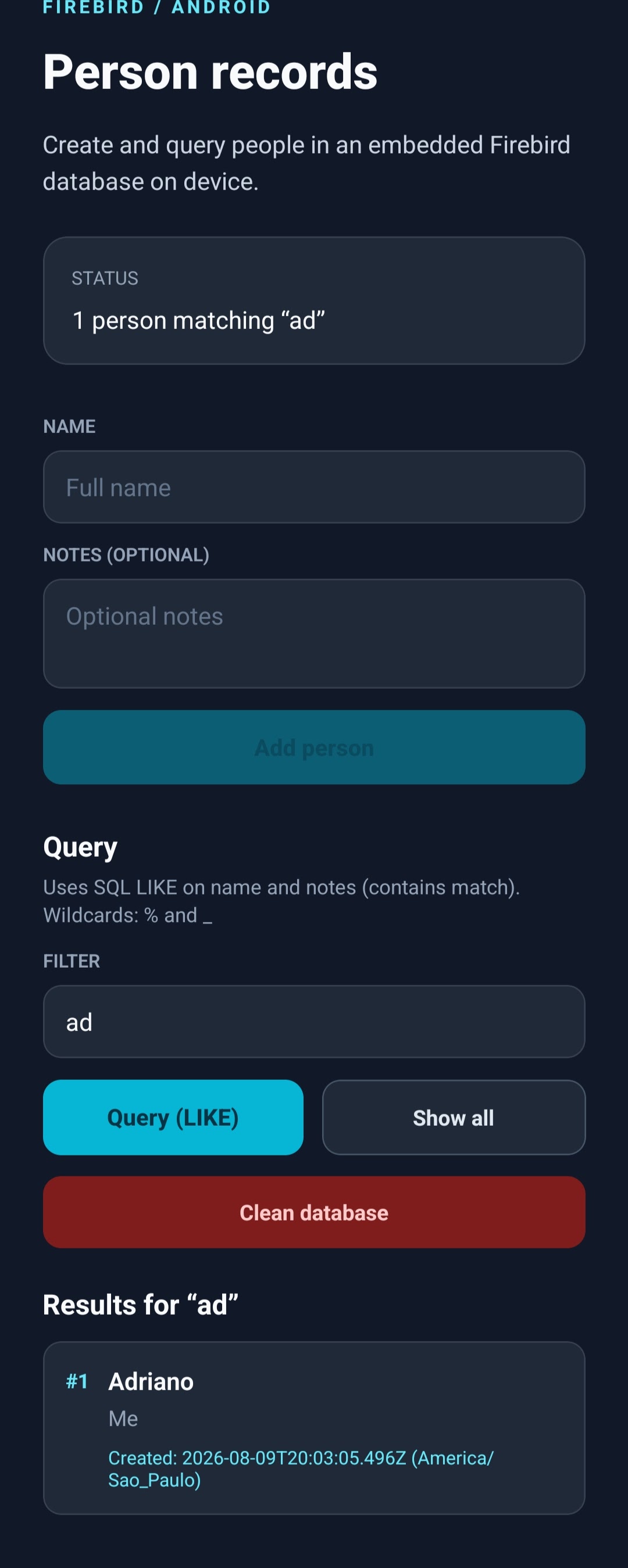
The example demonstrates that the database operations are ordinary Firebird operations behind a React Native user interface. It also exercises timestamps with timezone information, transactions, parameterized statements, and result set fetching.
Platform and setup requirements
The first release intentionally has a narrow scope:
- Currently supports Android only; iOS is not supported.
- React Native
0.86.2or newer with the New Architecture enabled. - Bare React Native applications or Android development clients; Expo Go is not supported.
- Android
minSdkVersion24 or newer. - An application-provided Firebird embedded AAR, added to the app's Android module.
The default configuration targets arm64-v8a, which is the usual ABI for a physical device. An x86_64 Firebird build
can be selected for an emulator, but the Firebird ABI and React Native native build must be configured consistently.
Selecting only the ABIs that the application needs avoids packaging copies of the engine for other architectures.
The repository also contains a reproducible Docker-based AAR reduction pipeline. It reduces ICU data and removes unused native plugins before Android packaging. The resulting size still depends on the selected ABI and the features the application needs from Firebird.
Initial installed size
As an initial reference, the example application was installed as a release build on a physical arm64-v8a device. The
device reported the following installed size:
| Category | Size |
|---|---|
| App | 58.07 MB |
| Data | 19.22 MB |
These are installed-device measurements for the initial example build, not a universal APK size guarantee. The final values vary with the selected ABIs, embedded Firebird assets, build configuration, and application data.
Current status
This is an early beta release intended for evaluation, testing, and feedback. The Android integration, JSI bindings, and high-level database paths are still evolving, and future releases may change as the package is used in more applications.
If you need an embedded Firebird database in a React Native application currently targeting Android, try
react-native-firebird and report your experience in the
GitHub repository.