tuidiff is a side-by-side diff viewer and editor that runs in the terminal,
and its initial release is now available.
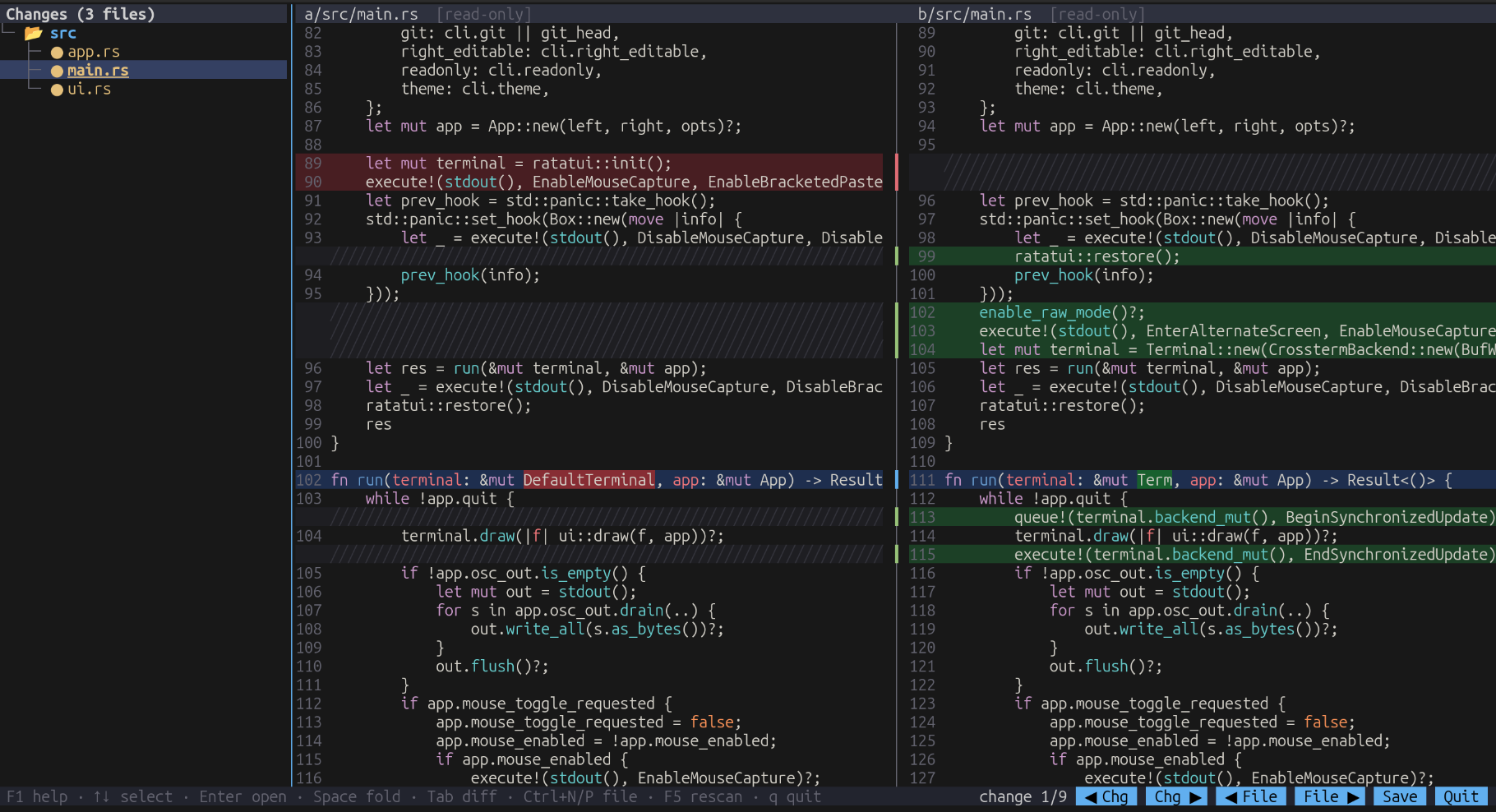
tuidiff compares two folders or two files, shows the differences side by side, and lets you edit either side while
the diff is recomputed live. It can also be used as a git difftool -d backend, so a whole set of changes can be
reviewed and adjusted in one place. It is written in Rust on top of ratatui and
crossterm, and it is fast: it is a single native binary that starts
instantly, and diffing and syntax highlighting are designed to keep the interface responsive even with large files.
Why this project exists
Graphical tools like Meld make it easy to review a set of changes folder by folder, copy hunks from one side to the other, and fix small things while looking at the diff. In the terminal, especially over SSH, the usual options are either a read-only diff output or a full editor with a diff mode that is not designed for comparing whole folders.
tuidiff tries to fill that gap: a folder-aware diff with a tree of changed files, aligned panes, and a simple built-in
editor, all inside the terminal.
Features
- A folder tree on the left lists only the files that differ.
●marks a modified file,✚a file only on the right,✖a file only on the left, and✔a file that became identical after your edits.✎marks unsaved changes. - Two diff panes show the old and new versions with aligned lines, syntax highlighting, and highlighted changed words within a line.
- A built-in modeless editor provides undo/redo, selection, find, and a clipboard. Edits recompute the diff immediately.
- A change can be copied from one side to the other with Meld-style
«/»arrows or withAlt+←/Alt+→. - Full mouse support: clicks, drag selection, double-click word selection, wheel scrolling, clickable change arrows and buttons, and a draggable tree splitter.
- Copy goes to the system clipboard, with OSC 52 as a fallback, so it also works through SSH in terminals that support it.
F1shows all key bindings grouped by section.
Unsaved edits are kept per file, so you can move between files in the tree and save everything at the end with F2.
Usage
tuidiff <LEFT> <RIGHT>          # two folders or two files
tuidiff .                       # inside a git repo: HEAD vs. working tree (like `git difftool -d HEAD`)
tuidiff <REV1>..<REV2> [PATH]   # inside a git repo: two commits (read-only); `...` uses the merge base
tuidiff --list-themes
tuidiff --theme "Solarized (dark)" a b
tuidiff . is the quickest way to review the current changes of a repository. The working tree side is editable and
saves go straight to your files.
Using it with git
tuidiff can be configured as a git difftool:
git config --global difftool.tuidiff.cmd 'tuidiff --git "$LOCAL" "$REMOTE"'
git config --global difftool.prompt false
git config --global diff.tool tuidiff        # optional: make it the default
After that, the usual commands work:
git difftool -d               # folder diff of the working tree vs. the index/HEAD
git difftool -d HEAD~3        # working tree vs. a commit
git difftool -d main feature  # two commits
git difftool                  # file-by-file mode also works
In git mode the left side is always read-only. The right side is editable when it represents the working tree: with
symlinks, saves go directly to your files; with --no-symlinks (the default on Windows), saves go to git's temporary
copy, which git copies back when the tool exits. When both sides are commits, edits would be discarded by git, and with
tuidiff REV1..REV2 both sides are read-only.
Under the hood
Lines are aligned using the Patience algorithm from the similar crate, with a
deadline so that very large or very different files do not block the interface. Changed words inside a line are found
with a second, word-level diff.
Syntax highlighting uses syntect. Parser states are cached per line, so highlighting is incremental and time-budgeted: an edit only invalidates the highlighting from the first changed line, and large files are highlighted progressively while the interface stays responsive.
tuidiff . and tuidiff REV1..REV2 call git to write the needed files into a temporary directory, so the rest of
the program only ever deals with comparing two folders.
Installation
Prebuilt binaries for Linux (statically linked with musl), macOS, and Windows, on both x86_64 and aarch64, are
available on the releases page.
It can also be built from source with Cargo. A C compiler is needed because syntect uses the bundled Oniguruma regex engine:
cargo build --release
Current status
This is the first release. If you try it, please report problems and suggestions in the GitHub repository.